TP-Link Tapo P110 Smart Plug
A compact Wi-Fi smart plug with built-in energy monitoring - no hub, no subscription, and nothing to install, so it is ideal for rented homes.
Strengths
- Built-in energy monitoring shows real-time and historical usage per appliance
- No hub and no subscription - everything works from the free Tapo app
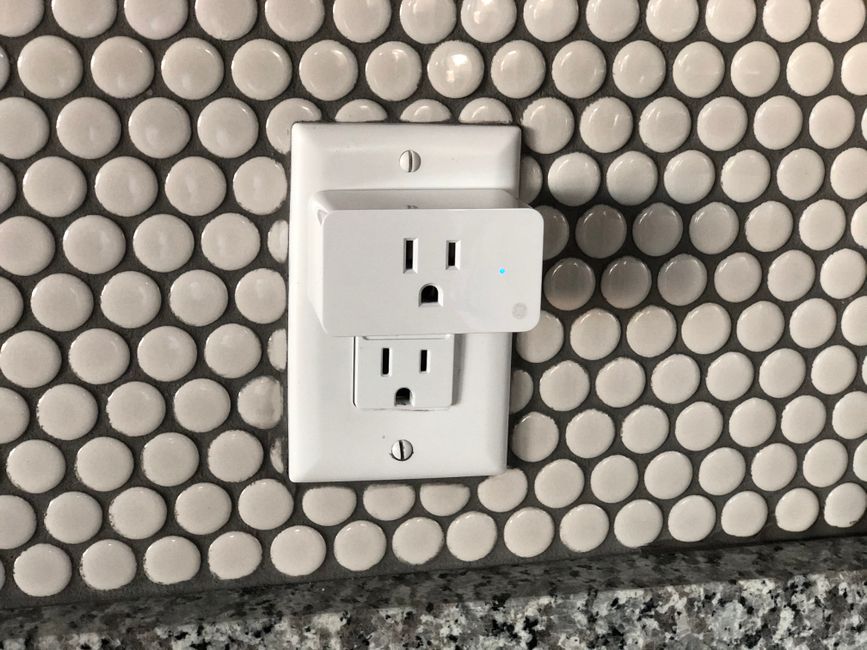
- Compact body designed not to block the adjacent socket on a UK double wall plate
Watch outs
- 2.4 GHz Wi-Fi only - it will not join a 5 GHz-only network
- No Matter support on this base model - the Tapo P110M variant adds it
- Indoor use only, and heavy motor loads or EV charging are excluded
- Connectivity Wi-Fi IEEE 802.11 b/g/n (2.4 GHz only)
- Hub required No - connects directly to the router
- Max load 13 A / 2990 W
- Power input AC 220-240 V, 50/60 Hz
We may earn a commission if you buy through this link - it never changes the price you pay or our editorial verdict.
As an Amazon Associate I earn from qualifying purchases.
What does the Tapo P110 actually measure?
It measures the power drawn by whatever is plugged into it, and keeps a history. TP-Link's specification covers real-time and historical usage in the Tapo app, which means you can point it at one appliance and get a per-device figure rather than the whole-flat number your meter gives you. That is the difference between knowing your electricity is expensive and knowing which thing is making it expensive.
The practical use is diagnostic rather than decorative. Leave it on a tumble dryer, a desktop PC or an old fridge for a week and you have a defensible number for that appliance, in kWh, that you can multiply by your unit rate. In a rented flat, where you rarely chose the white goods and cannot replace them, that number is mostly useful as evidence: for a conversation with the landlord, or for deciding what to unplug.
Why does energy monitoring matter more for renters?
Because renters inherit their appliances. An owner who finds their fridge is drawing far more than a modern equivalent can replace it and bank the saving over a decade. A renter cannot, so the value of measuring shifts from replacing to managing - scheduling, switching off at the plug, and knowing which habits actually cost something.
It also matters because the alternative is guesswork. Standby draw is the classic example: it is real, but it is much smaller than most people assume, and a monitoring plug settles the question for your specific device in a day rather than leaving you switching things off on principle. If you are building out several sockets, our guide to the best smart plugs for renters covers how the P110 compares with the cheaper non-monitoring models.
What will the Tapo P110 not run?
TP-Link's own limits are the ones to respect. The plug is rated 13 A / 2,990 W, it is indoor only, and the specification excludes EV charging and motors or compressors above 1/6 HP. That rules out the exact high-draw jobs people are most tempted to automate: a car charger, a large workshop compressor, an outdoor setup exposed to weather.
A subtler limit is the network. The P110 is 2.4 GHz only, on 802.11 b/g/n. If your router presents a single combined network name and steers devices to 5 GHz, setup can fail in a way that looks like a faulty plug. The usual fix is to split the bands temporarily, or use the router's guest or IoT network, which is worth knowing before you conclude the hardware is broken.
Do you need a hub or a subscription?
No to both, and that is the main reason it suits a rented home. The plug talks to your router directly, so there is no bridge to buy, site and power. Scheduling, timers, Away Mode and the energy history are all in the free app, with Alexa and Google Assistant voice control included at no extra cost.
That matters beyond price. Every hub is another mains socket, another box on a shelf and another thing to unplug and re-pair when you move. A plug that needs nothing but Wi-Fi is the lowest-commitment entry point into a rented smart home, which is why it tends to be the first device people buy. Our no-drill smart home guide sets out how to build the rest around it.
P110 or P110M: which should you buy?
The difference is Matter. The base P110 does not support it; the P110M variant does. If you intend to live inside the Tapo app, the base model is the cheaper and entirely functional choice, and its energy history is fully available there.
Buy the P110M if you want the plug to appear natively in another ecosystem's dashboard - particularly Apple Home, which the base P110 does not serve. It is worth being precise about what Matter does and does not carry: basic on/off and status travel well, while richer vendor-specific data such as detailed energy history has historically stayed best-supported in the manufacturer's own app. If the energy figures are the whole reason you are buying, check current support before paying the premium.
Does the Tapo P110 need a hub?
What is the maximum load on a Tapo P110?
Why will the Tapo P110 not connect to my Wi-Fi?
Is the energy monitoring accurate enough to be useful?
What is the difference between the P110 and the P110M?
- Connectivity
- Wi-Fi IEEE 802.11 b/g/n (2.4 GHz only)
- Hub required
- No - connects directly to the router
- Max load
- 13 A / 2990 W
- Power input
- AC 220-240 V, 50/60 Hz
- Dimensions
- 51 x 72 x 40 mm
- Material
- Flame-retardant UL94 V-0 polycarbonate
- Energy monitoring
- Real-time and historical usage via the Tapo app
- Voice control
- Amazon Alexa and Google Assistant
- Certifications
- CE, UKCA, RoHS
- Use
- Indoor only; motors/compressors above 1/6 HP and EV charging not supported